Codea Coded Cargo Bot on iPad – Octa Whale Tail Vacuum Stand [Video]

· Leave a comment
play audio Codea Coded Cargo Bot on iPad   Octa Whale Tail Vacuum Stand [Video]
Cargo Bot 125x125 Codea Coded Cargo Bot on iPad   Octa Whale Tail Vacuum Stand [Video]

Cargo Bot is the first program coded straight from the iPad using Codea

Today’s Productivity app is a game. Really? Well, not really. The game is a strategy game, so it tunes your mind, but whats so special about this app it it’s the first one that has been coded straight from the iPad.

Cargo Bot for iPad

Cargo Bot is the game. It’s a strategy game that has you moving boxes from one platform to the next. You have to program the machine with instructions. The least amount of instruction to put the boxes in proper order wins the round.

Codea Coding on iPad

Codea Codea Coded Cargo Bot on iPad   Octa Whale Tail Vacuum Stand [Video]

Program an iPad app using Codea

Cargo Bot was coded using a program called Codea. Codea uses a vector graphics and imaging engine that can let you make anything from boxes to bugs. Characters for your brick busting game, or your 3rd person adventure game.

Codea also has a forum, filled with other coders putting together iPad apps. You can grab open source projects to make your own programs, or just learn the software. Codea is built on the Lua programming language. More important, you don’t need a Mac to create programs. All you need is an iPad.

The program cannot accept certain things like photos, JSON or XML just yet. Future releases could support these functions, to make it a really powerful creation engine.

Codea is $9.99 in the app store. It’s brought to you by Two Lives Left

Octa iPad Whale Tail Vacuum Dock Suction Cup Stand

Octa 208x250 Codea Coded Cargo Bot on iPad   Octa Whale Tail Vacuum Stand [Video]

Octa Whale Tail Vacuum Cup Stand

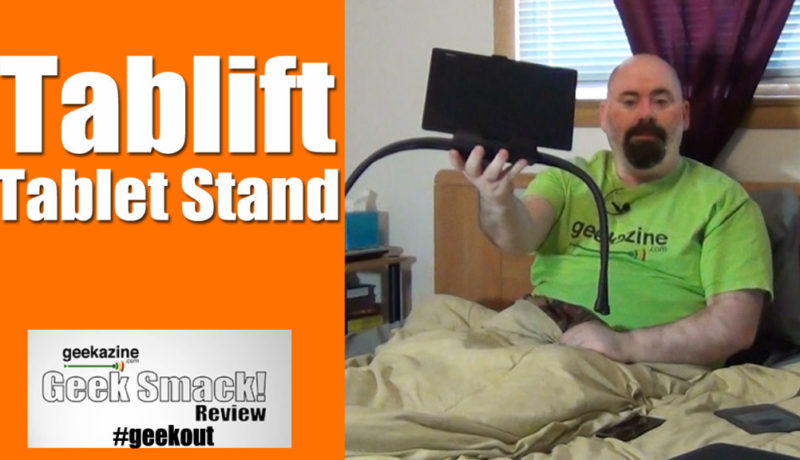
I also show off a different type of stand. Octa Whale Tail is a suction cup stand that can affix to your iPad or a case (if it’s not porous). Put the base on, then push the button to add suction. In using the iPad this way, I felt this was more ergonomic and I could hold it a lot longer.

However, if you remove the rubber cap, and put on the Whale tail, you have a really nice iPad stand. Best part – when I was sitting on the couch, I positioned the tail on my leg, and the iPad was setting upright more. That way, I could read, or watch a video without having to hold the tablet, and relax more.

Octa does more than just iPad. It can work with any tablet on a non-porous surface. Try this – Suction the Vacuum dock to a wall, then use the tail to hold the iPad.

You can get Octa Whale Tail on Amazon Codea Coded Cargo Bot on iPad   Octa Whale Tail Vacuum Stand [Video] for $49.95.

Subscribe to iPad365 on iTunesiPad365 RSSTwitter: @iPad365YouTube iPad365 Playlist

Check out the previous iPad episode – Best LED Machine Signage App

Best LED Machine LED Signage App for iPad [Video]

· Leave a comment
BestLEDMachine Best LED Machine LED Signage App for iPad [Video]play me 970 Best LED Machine LED Signage App for iPad [Video]
Best LED Machine Best LED Machine LED Signage App for iPad [Video]

Best LED Machine for iPad

I have 2 LED signs behind me on the show, but with this app, I could easily change it up. Best LED Machine is an app that turns your iPad into an LED signage. The free version will program one line, however the pro version will let you set up multiple lines of text.

You can change the colors of the text, and the color of the background, too. You can have square LED dots, circular, or line LED dots. Choose to scroll, move up, drop down, and more. Change the font, change the scroll speed, and change the size of the text.

I might just change out the old LED signs for an iPad on my wall.

Best LED Machine works for iPhone and iPad and is only .99¢

Subscribe to iPad365 on iTunes – iPad365 RSS - Twitter@iPad365 - YouTube iPad365 Playlist

Check out the previous iPad episode –MLB at Bat for iPad


MLB at Bat App for iPad [Video]

· Leave a comment
play audio MLB at Bat App for iPad [Video]
Screen Shot 2012 05 12 at 9.05.07 PM MLB at Bat App for iPad [Video]

MLB at Bat for iPad

We look at an app for all you sporting and baseball fans. The MLB at Bat app is for iPad and iPhone, and keeps you up to date with scores, and schedules. While the game is being played, you can watch the play by play action from the app. For a fee, you can watch your favorite teams games right on the iPad. You can listen to the audio of the game if it’s on.

For the statistician, you can get all your player information in one place. The box score gives you all the hits, runs, RBI, and AVG of the players. Head over to the highlights to see what happened during the game.

The coolest feature is the at bat graphic. Watch as the ball gets thrown, the graphic shows where the ball ended up, what type of pitch it was and how fast it went.

Subscribe to iPad365 on iTunes – iPad365 RSS - Twitter@iPad365 - YouTube iPad365 Playlist

Check out the previous iPad episode – Kickstarter Project Etcher

MLB at bat 250x187 MLB at Bat App for iPad [Video]

MLB at bat


Kickstarter Projects including Etcher – Etch a Sketch for iPad [Video]

· Leave a comment
play audio Kickstarter Projects including Etcher   Etch a Sketch for iPad [Video]
kickstarter 250x247 Kickstarter Projects including Etcher   Etch a Sketch for iPad [Video]

Kickstarter iPad Projects

Today, we look at Kickstarter programs that you can back. Of course, Kickstarter is a website where projects can get funded so they can be created. Bands can get money for albums, and directors can get funds to make movies. We look at the technology aspect of this system, with 5 different projects you can back to help in the iPad.

Pressure Pen

I like the idea of a stylus for iPad, however, for artists, you need to have one that can add pressure so you can have thicker brush strokes. That is what pressure pen is for. The company tried for funding once, but didn’t make their goal. They are trying a second time to get the funding to put this pen into production.

Brydge iPad mount 

Imagine taking your iPad and turning it into a laptop no bigger than a Macbook Air. While it doesn’t give you a Lion OS, the iPad will feel more like a laptop. Perfect for those people who really need a smaller computer when they are moving around. Brydge has a patent pending hinge dock system that allows you to attach the iPad securely.

LeviSync Arm for iMac

rightback21 125x125 Kickstarter Projects including Etcher   Etch a Sketch for iPad [Video]

LeviSync for iMac

LeviSync is an arm you attach to your iMac, which lets you set your iPad level to your monitor. Add in a desktop monitor extension software, and you can turn your iPad into another monitor. The arm can be on the left side or the right, and is also a 4-port USB hub.

Töd GPS for iPad, iPhone

It’s a little disc you can put into your pocket, and it will track you via your iPhone or iPad. You could put it in your kids’ pocket and know where he or she is. Put it around a collar, and you can track your dog. The disc is small, so it could be incorporated into items like computers, which the beacon code can be tracked from almost anywhere. The device takes little power, the CR 2032 battery will last for a long time.

Etcher: Etch a Sketch Enclosure for iPad

knobs1 250x166 Kickstarter Projects including Etcher   Etch a Sketch for iPad [Video]

Etcher: Etch a Sketch for iPad

A few weeks back, I said it would be great if someone was making a Bluetooth enclosure that turned your iPad into an Etch a Sketch. Well, I guess someone was already working on that. After many prototypes, the final enclosure is ready to produce. The enclosure contains two knobs, which work exactly like the original Etch a Sketch. The case also can be used as a regular iPad case.

The adjoining software allows you to create images though a single line. You can even shake the iPad to erase the image!

Etcher is created by Ari Krupnik, Maarten Dinger, Alex Gutierrez and Lee Felsenstein. Of course, the original Etch a Sketch is trademarked by the Ohio Art company, which the group has a license to produce this new version of iPad case.

Subscribe to iPad365 on iTunes – iPad365 RSS - Twitter@iPad365 - YouTube iPad365 Playlist

Check out the previous iPad episode – Music Apps of iPad


Music Apps of iPad: Spotify, Shazam, Stitcher, iHeartRadio [Video]

· Leave a comment
play audio Music Apps of iPad: Spotify, Shazam, Stitcher, iHeartRadio [Video]
Geekazine 194519031 Music Apps of iPad: Spotify, Shazam, Stitcher, iHeartRadio [Video]play me 970 Music Apps of iPad: Spotify, Shazam, Stitcher, iHeartRadio [Video]

Today we look at the music apps of iPad. These are some great ways for you to get music to your iPad other than iTunes.

iheartradio Music Apps of iPad: Spotify, Shazam, Stitcher, iHeartRadio [Video]

iheartradio for iPad

iHeartRadio

iHeartRadio is a great way to get your radio stations when you are not in the vicinity of the signal. iHeartRadio connects to your Facebook, and you can program your own radio station, so you get exactly what you want for music. iHeartRadio is a Clear Channel company, with over 800 stations coast to coast. So if you are in Houston, you can still listen to your home station in Wisconsin.

iHeartRadio is an app for iPhone and iPad. You can also get the app for Android, Blackberry, XBox, and Windows phone.

Stitcher

Stitcher 125x125 Music Apps of iPad: Spotify, Shazam, Stitcher, iHeartRadio [Video]

Stitcher for iPad

Stitcher Internet Radio is an app for not only podcasters, but also live radio stations. Stitcher just upgraded their app to bring a social aspect to their site. You can connect to Facebook and find out what your friends are listening to. Of course, you can also set your favorite shows, so you can go from one show to the next.

Stitcher is available for iPad, iPhone, Android, Blackberry, and WebOS.

Spotify

The hit music service that came from the UK this last year finally gets an iPad app. Spotify is a music service that works on PC, iPhone, or iPad. You can listen for free (limited), or with a subscription. Connect up to Facebook so everyone knows what you are listening to.

Shazam

You might not think of this as a music service, but with Shazam, you can not only find out who the artist is, you can get their music for your collection. Watch the tag stream to find out what songs are popular. Or just see who is tagging what.

With recommendations, you could find some new music by your favorite artists. Shazam is also available for Android, Nokia, Blackberry, and Windows Phone 7.

Subscribe to iPad365 on iTunes – iPad365 RSS - Twitter@iPad365 - YouTube iPad365 Playlist

Check out yesterdays iPad app – JamUp Pro


JamUp Turns iPad Into Pedal board [Video]

· Leave a comment
play audio JamUp Turns iPad Into Pedal board [Video]
Geekazine iPad365JamUpProPositiveGridAdaptorForIPad685 7161 JamUp Turns iPad Into Pedal board [Video]play me 970 JamUp Turns iPad Into Pedal board [Video]
JamUp JamUp Turns iPad Into Pedal board [Video]

JamUp for iPad

Positive Grid created this dongle that you connect to an iPad, and it will let you connect your guitar for $19.99. That is a very useful connector. There is a lot more to this, though. It’s part of an iPad app called JamUp.

The JamUp Lite and JamUp Pro is a digital amp and effects processor.  24 hybrid amps/effects, 16 user presets, sound-on-sound phrase sampler, iTunes player and more. Perfect for studio work, or just a good practice.

You can choose from 6 amp models and convolution cab simulator, spring and digital reverb, tangy modulations, tape and digital delays, classic and fuzzy distortions, filters, compressors, noise gate and other essentials. JamUp also has “play along” capabilities. Capture loops and riffs and create sound-on-sound overdubs.

You can also use the dongle to connect to other software. For instance, you can use this connector for Garage band – Just select the amp and effects in Garage band, and record your licks.

JamUp Lite is free, and JamUp Pro is $9.99. You can get additional pedals and amps for in-app purchases.

Subscribe to iPad365 on iTunes – iPad365 RSS - Twitter@iPad365 - YouTube iPad365 Playlist

Check out yesterdays iPad app – Montezuma Stones